Compendium format guide
The short answerEvery entry in the Compendium is short text: a label, a colon and a value on each line. To write one, press ⋯ beside Homebrew on the Compendium page, then New homebrew…, and pick its kind. The homebrew editor offers each line the kind can have, explains the line you are on, and draws the entry in its Preview as you type.
- For players and DMs
- 8 short steps
- Updated 18 November 2026, for Archivist 1.7.0
This page's example starts a new condition in the homebrew editor, Seasick, from the Drowned Coast.
Start an entry in the homebrew editor
- In the top bar, press Compendium.
- In the Compendiums list on the left, press ⋯ beside Homebrew, then New homebrew…. On a computer, the ⋯ shows when you point at the row.
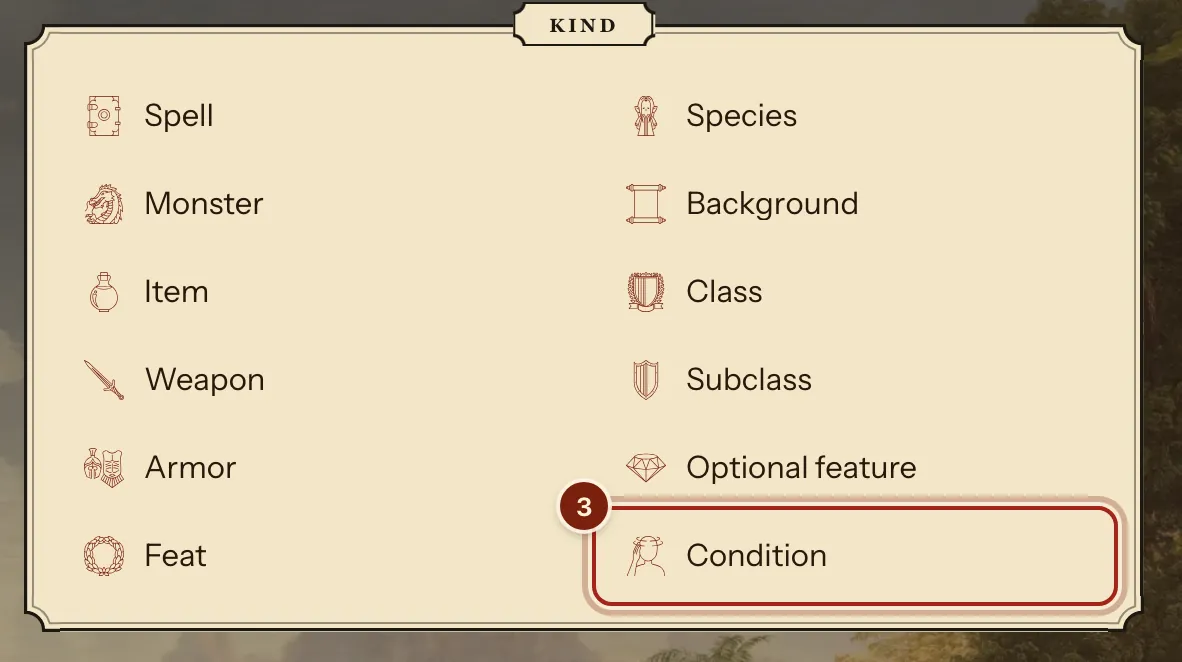
- Under Kind, press a kind of entry. Here it is Condition.
- Read the starter text in the Text frame: a few lines to begin with, such as
name:anddescription:. - Start typing a label at the start of a line. The editor offers the lines this kind can have, each with what it does: press one, or use the arrow keys and Enter.
- Read the line at the bottom of the Text frame: it explains the line you are on. The Preview draws the entry as you type.
Ctrl+Space (Cmd+Space on a Mac) opens the offered lines by hand. On a phone, Text and Preview are two tabs.
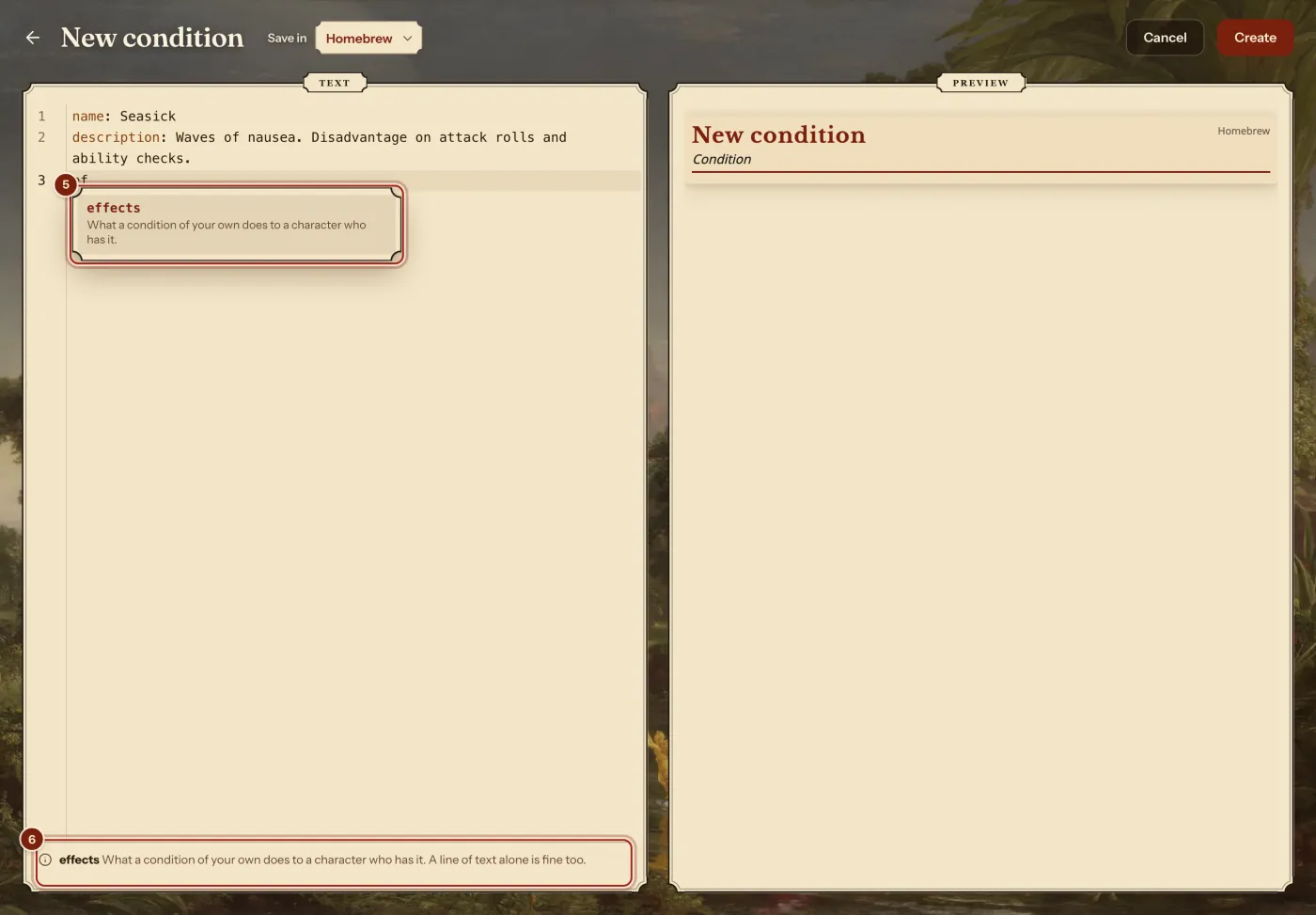
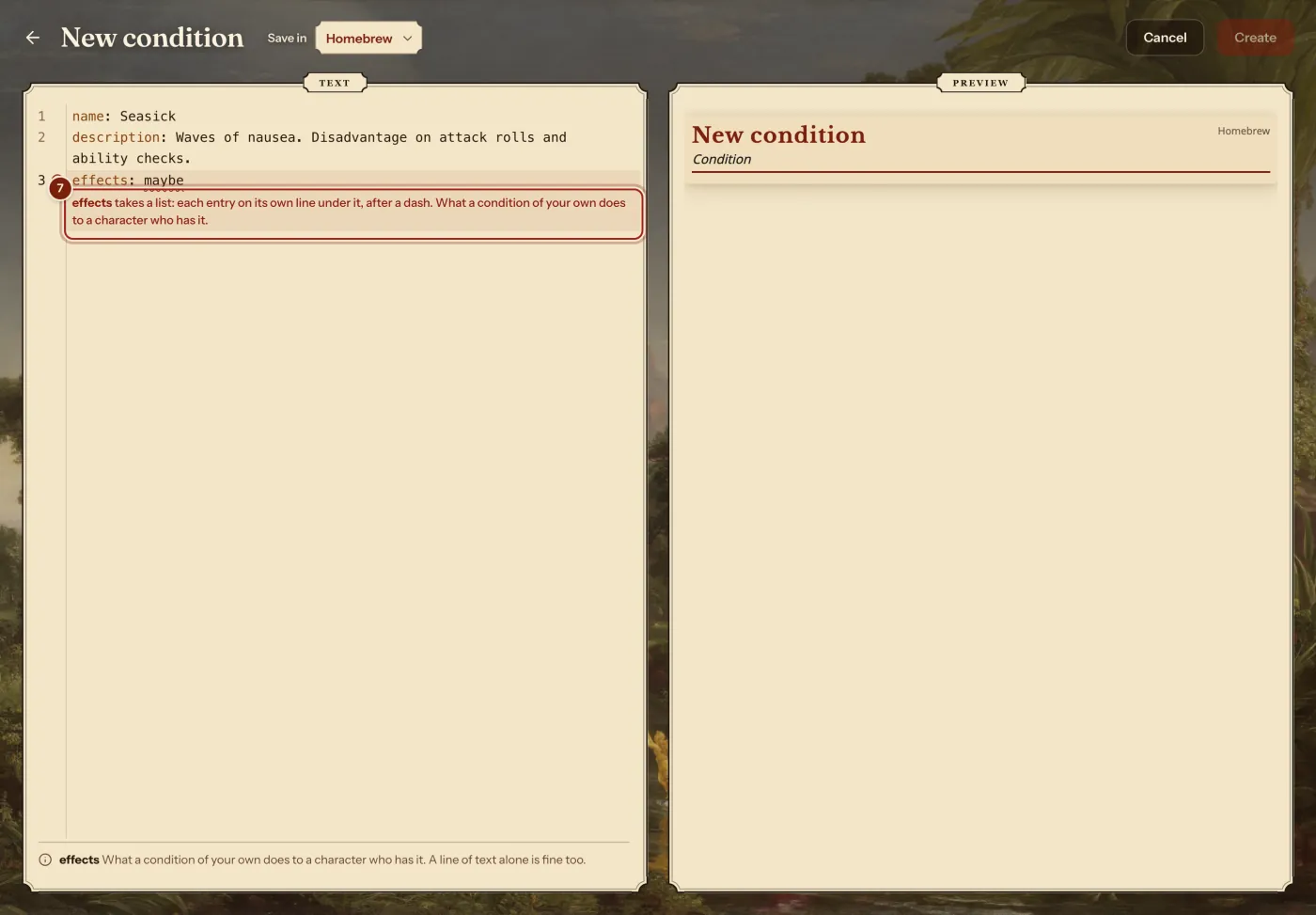
- A line that needs fixing is marked where it is, with what to change under it. Fix it and the mark goes.
- Press Create. Your entry opens in the Compendium.
To read a finished entry's lines, copy one from the SRD with Copy to my compendium, then press ⋯ and Edit on your copy: the same editor opens.
The twelve kinds of entry
Each guide below has ready lines you can paste, and a table of the lines used most.
| Kind | What it gives a character | The guide |
|---|---|---|
| Class | Hit points, saves, proficiencies, features by level, spell slots. | Make a homebrew class |
| Subclass | Features by level, inside its class. | Make a homebrew subclass |
| Species | Speeds, senses, traits and defenses. | Make a homebrew species |
| Background | Skills, tools, ability increases, an Origin feat, equipment. | Format guide: backgrounds |
| Feat | Effects on the numbers, and its benefits. | Make a homebrew feat |
| Optional feature | An option a class picks from, such as an invocation. | Format guide: optional features |
| Item | Charges, attunement, bonuses and defenses. | Make a homebrew magic item |
| Armor | Armor Class. | Format guide: armor and weapons |
| Weapon | An attack row, with its to-hit and damage. | Format guide: armor and weapons |
| Spell | A row on the Spells tab, with its save or attack and its dice. | Make a homebrew spell |
| Monster | A full stat block with rollable attacks. | Make a homebrew monster |
| Condition | A chip on the sheet, with effects on the rolls. | Track conditions and make your own |
How a line works
Four rules cover almost everything you will type.
| Rule | Example | What it means |
|---|---|---|
| A label, a colon, a value | hit_die: d10 | One fact per line. A space follows the colon. |
| Spaces show what belongs to what | speed:, then walk: 30 on the next line | Two spaces at the start put a line inside the one above it. |
| A dash starts an item of a list | classes:, then - druid | One item per line. |
| Quotes keep a sentence whole | name: "Rule of Three: The Tide" | Use double quotes when your words hold a colon. |
Questions
Create does nothing. What now?
A line that needs fixing is marked where it is, with the words under it, such as "concentration takes true or false." Pressing Create or Save takes you to the first one. Fix it, and the mark goes. Keep the spaces at the start of each line, and if a sentence has a colon in it, put the whole sentence in double quotes.
Can I write an entry from nothing?
Yes. New homebrew… starts one from a short starter text, and the editor offers every line the kind can have. Copying the closest entry also works, when you want most of its lines. See Make homebrew from scratch.
Can I share what I write?
Yes. Share homebrew with your party shows how to send a whole compendium as one file.
Keep going
- Make a homebrew class and play itCopy the closest class, change it in the homebrew editor, and play it.
- Make a homebrew magic itemWrite it in the homebrew editor, then add it from your character's Inventory.
- Make a homebrew spellWrite it in the homebrew editor, then prepare it and cast it from the sheet.
- Format guide: backgroundsPaste ready lines for a background into the homebrew editor.
- Share homebrew with your partyExport your compendium as a zip; they bring it in with Import homebrew.