How to update your homebrew when it changes
The short answerOn the Compendium page, press Import homebrew, then Archivist files and Continue, and drop in the new compendium file. Archivist compares it with the one you have and shows how many entries are new, changed and unchanged; press Replace to update it, Keep both for a second copy, or Skip.
- For DMs and players
- 5 short steps
- Updated 18 November 2026, for Archivist 1.6.2
The example is a Homebrew compendium with one new entry, one changed and one unchanged.
Import the new version
- Press Compendium, then Import homebrew.
- Press Archivist files, then Continue. Drop in the compendium's zip file, or press Choose files and pick it. Archivist says what it found, and that the compendium is already here. Press Import.
- Archivist compares it with yours and says, for example, 1 new, 1 changed, 1 unchanged. The arrow on the row shows the counts here and in the file, and what your choice will do.
- Replace is picked: it adds the new entries and updates the changed ones. Or press Keep both to bring it in as a second compendium, or Skip.
- Press Import.
Replace leaves entries only you have, and your hidden and read-only settings, as they are. A Replace can't be undone, so pick Keep both if you want to compare first.
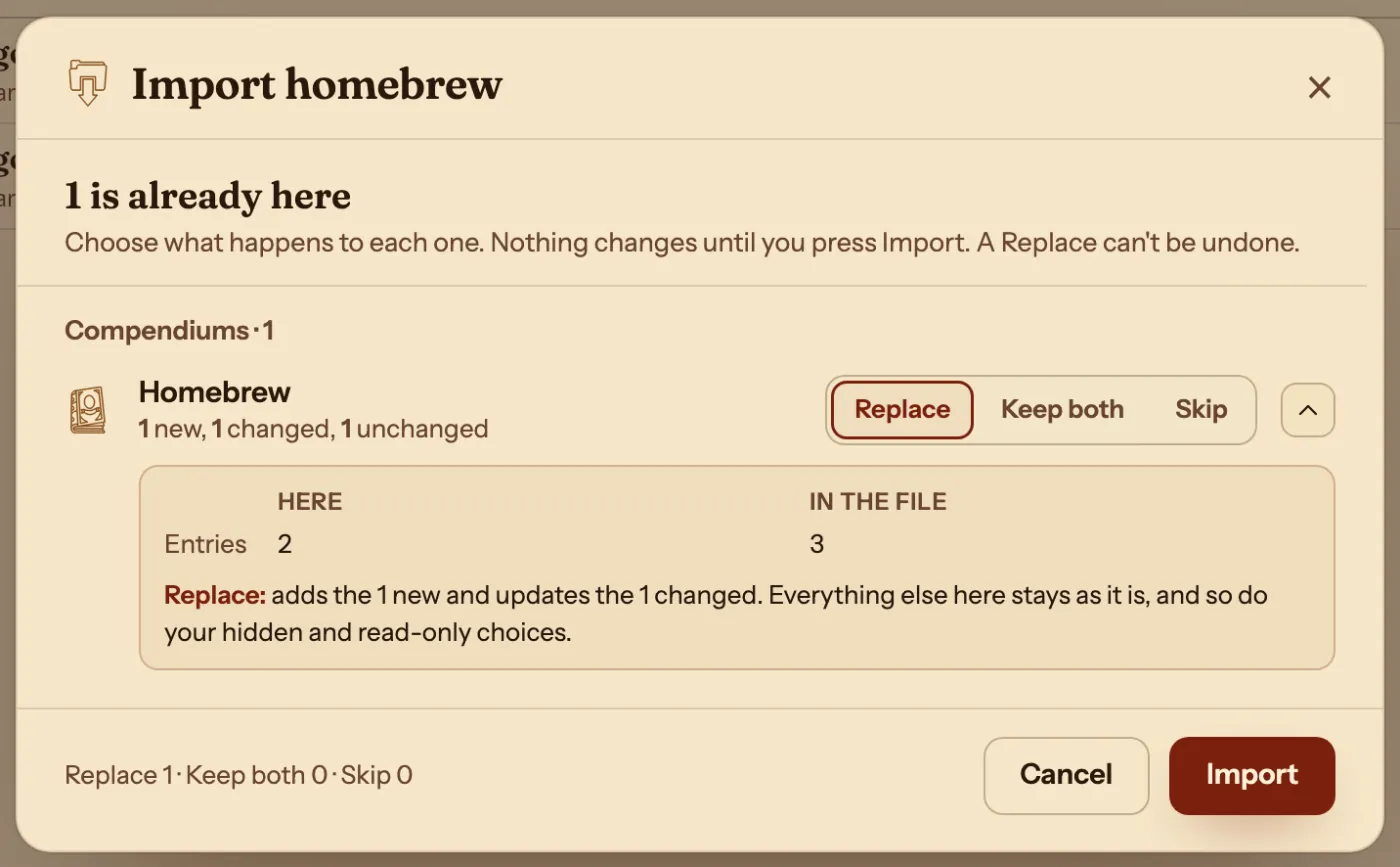
Replace, Keep both or Skip
You choose for each compendium in the file.
| Choice | What happens |
|---|---|
| Replace | New entries are added and changed ones updated. Your own extra entries stay. |
| Keep both | The file comes in as a second compendium, named with (2). |
| Skip | Nothing from that compendium comes in. |
Questions
Where do I get the compendium file?
Whoever keeps the homebrew presses ⋯ beside it in the Compendiums list on the Compendium page, then Export, and sends the zip. See Share homebrew with your party.
Do my characters pick up the changes?
Yes. A changed entry reaches every character that uses it.
My homebrew is a PDF. How do I update it?
Give the new PDF to your own chat app, connected to Archivist, and ask it to update the entries in that compendium. See Bring a whole homebrew book into Archivist.
Keep going
- Share homebrew with your partyExport your compendium as a zip; they bring it in with Import homebrew.
- Bring a whole homebrew book or supplement into ArchivistGive your chat app the book, and it brings it in batch by batch.
- Bring in homebrew from a PDF, a web page or pasted textGive your chat app the PDF, the page or the text, and it makes the entries.