How to add Sanity to a 5e character sheet
The short answerMake Sanity and the ability that spends it as two entries in the homebrew editor, from the lines below, then add both to your character with Extra features in the Builder. Sanity then sits on the strip at the top of the sheet with + and −, and the ability waits on the Actions tab with Activate and a Spend control.
- For players and DMs
- 11 short steps
- Updated 18 November 2026, for Archivist 1.7.0
The example is Forbidden Insight: as a Bonus Action, roll 1d6 and spend that much Sanity, and for 1 minute your weapon hits deal an extra 1d6 Psychic damage and you have Advantage on Perception and Insight checks. Change any word or number to suit your table.
Make the Sanity tracker
- In the top bar, press Compendium. In the Compendiums list on the left, press ⋯ beside Homebrew, then New homebrew…, then Optional feature.
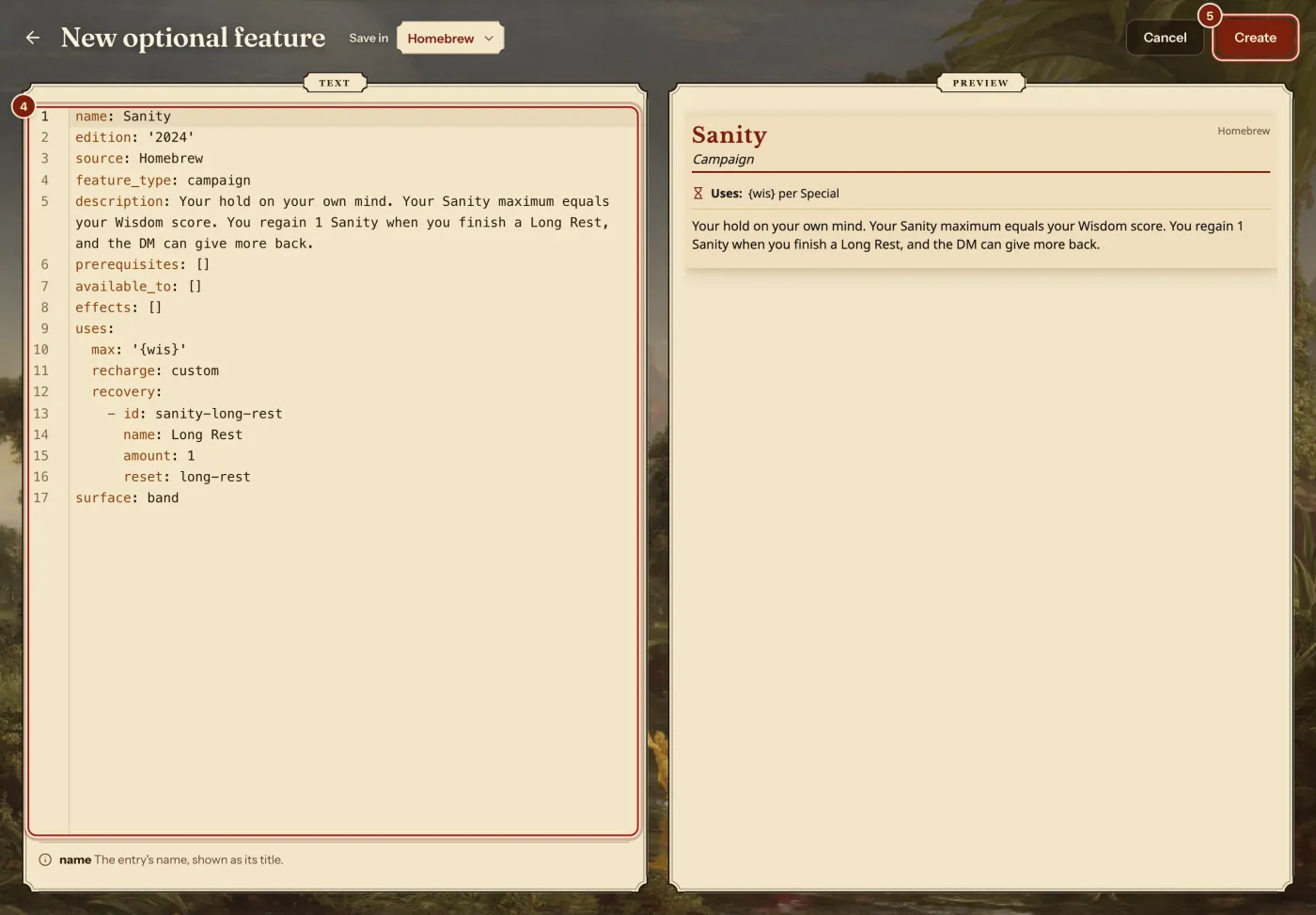
- In the Text box, select all of the starter text, paste these lines over it, keep Homebrew beside Save in, and press Create:Sanity
name: Sanity
edition: '2024'
source: Homebrew
feature_type: campaign
description: Your hold on your own mind. Your Sanity maximum equals your Wisdom score. You regain 1 Sanity when you finish a Long Rest, and the DM can give more back.
prerequisites: []
available_to: []
effects: []
uses:
  max: '{wis}'
  recharge: custom
  recovery:
    - id: sanity-long-rest
      name: Long Rest
      amount: 1
      reset: long-rest
surface: band
max: '{wis}' makes the maximum your Wisdom score, and it follows the score when it changes. Made in Homebrew, its link name is homebrew_optional-feature_sanity: that is how the ability below finds this tracker.
Make the ability that spends it
- Do the same for Forbidden Insight: ⋯ beside Homebrew, New homebrew…, Optional feature, paste these lines over the starter text, and press Create:Forbidden Insight
name: Forbidden Insight
edition: '2024'
source: Homebrew
feature_type: campaign
description: "As a Bonus Action, you let the whispers in. Roll `dice:1d6` and spend that much Sanity. For 1 minute, your weapon hits deal an extra 1d6 Psychic damage, and you have Advantage on Wisdom (Perception) and Wisdom (Insight) checks."
prerequisites: []
available_to: []
action_cost: bonus-action
activatable: true
duration:
  amount: 1
  unit: minute
consumes:
  resource: homebrew_optional-feature_sanity
  amount: 1
  amount_max: 6
effects:
  - kind: damage-bonus
    damage_type: psychic
    amount: 1d6
    applies_to: weapon
  - kind: roll-modifier
    mode: advantage
    roll: ability-check
    scope: Perception and Insight
consumes is what one use spends: 1 to 6 Sanity. activatable gives it the Activate button, and its effects count only while it is on.
Give both to your character
- Open your character, press the gear beside the name, and choose Builder.
- Below the steps on the left, press Extra features, then Add a feature.
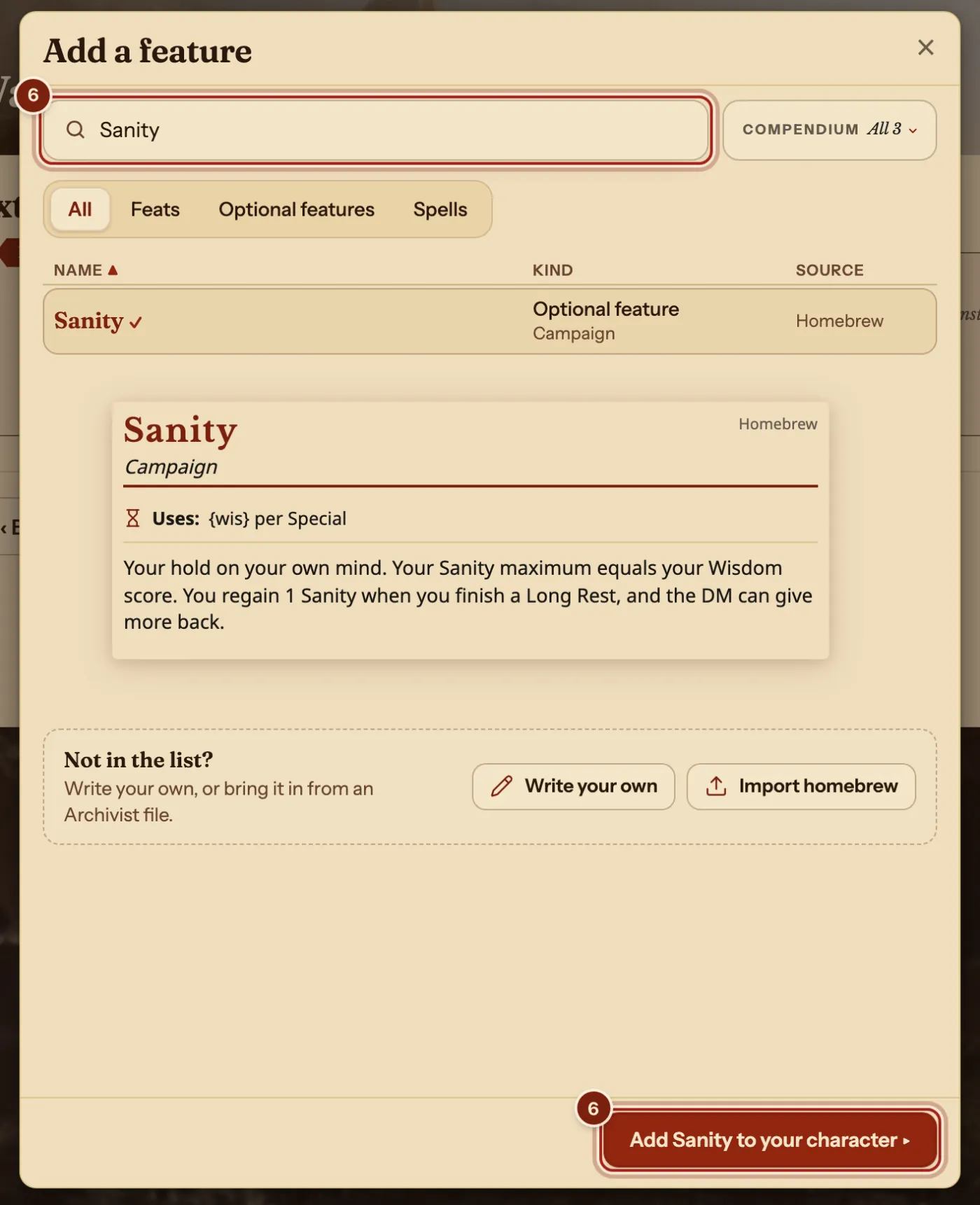
- Search for Sanity, press it to read it, and press Add Sanity to your character.
- Press Add a feature again and add Forbidden Insight the same way. Then press Done and Keep changes.
Both show as Optional feature in the list, from your Homebrew compendium. Add feats, boons and DM gifts with Extra features shows the Extra features page step by step.
Play it
- Sanity sits on the strip at the top of the sheet, beside your Hit Dice. Press − or + to change it, or press the number and type.

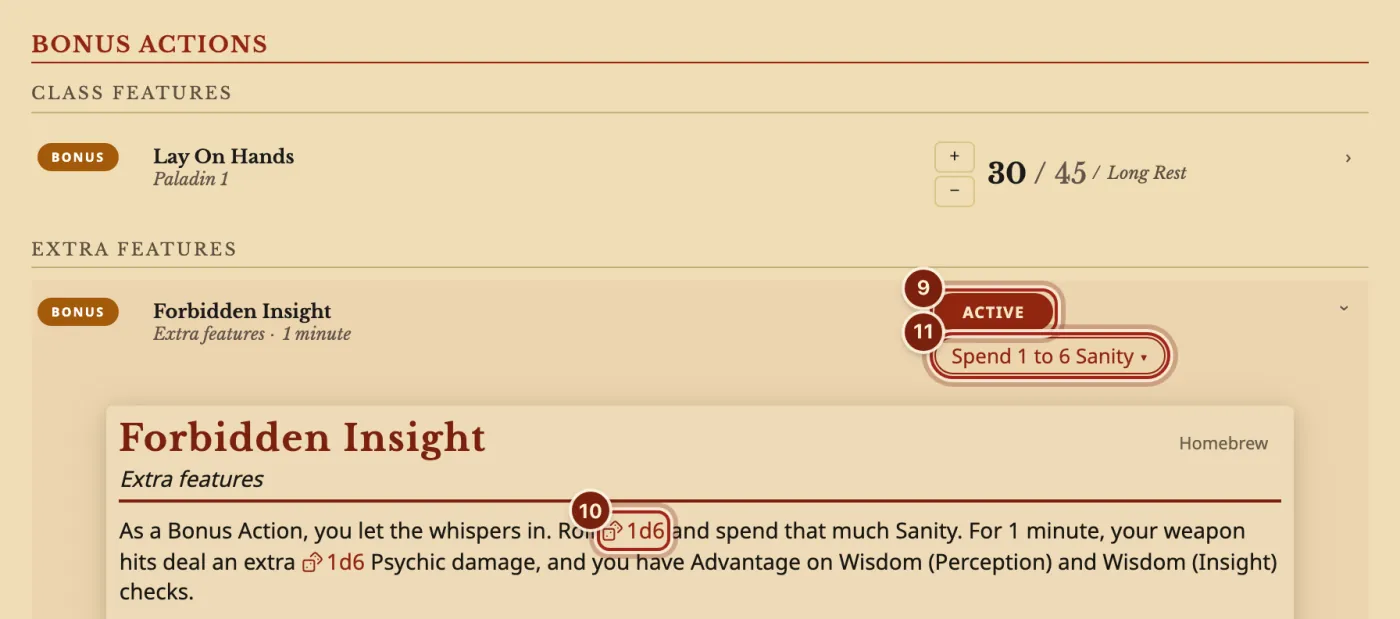
- On the Actions tab, under Bonus Actions, press Activate on Forbidden Insight. It reads Active for as long as it is on.
- Press the row to open its card, and press 1d6 to roll.
- Press Spend 1 to 6 Sanity and press − once for each point you rolled.
While it is on, each weapon row's damage reads, for example, 1d8+4 slashing + 1d6 psychic, and Perception and Insight roll with Advantage. Press Active again after the minute to switch it off. Every rest also offers to end it.
What the sheet does with it
Everything below comes from the lines you pasted. Change a number and the sheet follows.
| Part | On the sheet |
|---|---|
| Sanity's maximum | Your Wisdom score. A higher Wisdom raises it at once and keeps what you spent. |
| Losing and gaining Sanity | − and + on the top strip, or type the number. It never refills by itself. |
| A Long Rest | Gives back 1 Sanity, listed in the Long Rest window with a box you can untick. |
| Forbidden Insight | A Bonus Action row with Activate, its duration and Spend 1 to 6 Sanity. |
| While it is active | +1d6 Psychic on every weapon's damage, and Advantage on Perception and Insight checks. |
| Rolling the cost | The 1d6 in its card rolls the dice. You then take that many points off with Spend. |
Questions
Can Archivist take the rolled amount off by itself?
You roll the 1d6 from the card and press − that many times. Switching the ability on never spends Sanity by itself, so you can also use it when your DM sets the cost.
Can I put Sanity somewhere else on the sheet?
Yes. It is also on the Resources tab. To choose what sits on the top strip and in what order, see Choose the resources on top of your sheet.
I am the DM. How do my players get it?
Make the two entries once, then on the Compendium page press ⋯ beside your compendium, then Export, and send them the zip file. Each player brings it in with Import homebrew and adds both with Extra features. Share homebrew with your party shows each step.
Create does nothing. What now?
A line that needs fixing is marked where it is, with the words under it, such as "concentration takes true or false." Pressing Create or Save takes you to the first one. Fix it, and the mark goes. Keep the spaces at the start of each line, and if a sentence has a colon in it, put the whole sentence in double quotes.
Can I make a different resource the same way?
Yes: Hero Points, Corruption, Stress or Luck. Change the name, the description and the max line, such as max: 5 or max: '{prof}' for your Proficiency Bonus.
Keep going
- Choose the resources on top of your sheetAppearance, then Pinned: pick up to five and put them in order.
- Track Rage, Channel Divinity, Bardic Inspiration and Focus PointsEvery use is a tick box or a counter, and rests fill them back.
- Compendium format guideHow a line works, the twelve kinds of entry, and the homebrew editor's help.
- Format guide: optional featuresPaste ready lines for an option into the homebrew editor.
- Share homebrew with your partyExport your compendium as a zip; they bring it in with Import homebrew.